Showing posts with label Emulators. Show all posts
Wednesday, 6 April 2016
RPi and QL Emulator Speeds
QTop-INDEX
Here's an updated table of results using QTop-INDEX V1.05 on different QL
compatible computers:
Modell & Setup ROM INT REAL TRIG TEXT GRAF STORE TOTAL INDEX
-------------------------------------------------------------------------
QL 128K (mdv) MGG 5.3 12.5 20.0 95.0 15.0 6.5 154.3 1.000
QL/TC2 768K JS 3.0 7.6 16.1 95.0 14.0 7.9f 143.6 1.258
CST Thor 8 640K MF 3.0 7.5 16.2 91.0 13.0 7.2f 137.9 1.295
QL/CST RAM+ 640K MGG 2.9 7.1 15.3 94.0 14.0 5.8f 139.1 1.350
AMIGA 1000 2MB JS 1.8 4.4 10.9 45.0 7.0 30.0f 99.4 2.015
CST Thor 21 640K JS 2.4 6.8 3.3 62.0 13.0 7.3f 94.8 2.281
CST Thor XVI 1MB PT 1.9 4.4 8.5 35.0 6.0 5.6f 61.4 2.393
QL/GOLDCARD 2MB MGG 0.8 1.9 4.3 38.0 6.0 1.1w 52.1 4.772
QL/GOLDCARD 2MB JSL1 0.8 1.9 3.6 36.0 5.0 1.0w 48.3 5.127
MEGA ST1 16MHz HC JS 0.8 2.2 4.4 21.0 3.0 1.2w 32.6 5.299
EXEQTOR JSL1 0.8 1.9 2.1 32.0 5.0 0.8w 42.6 6.137
MEGA ST4 68030/25 JS 0.3 0.9 1.8 10.0 2.0 0.2w 15.2 15.361
QXL 2MB SMSQ 2.03 HBA 0.2 0.5 1.1 4.0 1.0 0.2w 7.0 23.488
QXL 2MB SMSQ 2.16 HBA 0.2 0.3 0.7 2.0 1.0 0.1w 4.3 37.373
(QXL at 25MHz)
QTop-Index is a program that is part of the COWO QTop desktop system for QL systems, currently freeware downloadable from Dilwyn Jones site. It tests a number of benchmarks such as writing to the screen, graphics, integer and floating point arithmetic etc to allow fairer comparisons of different types of systems. The table has been copied from the QTop updates documentation.
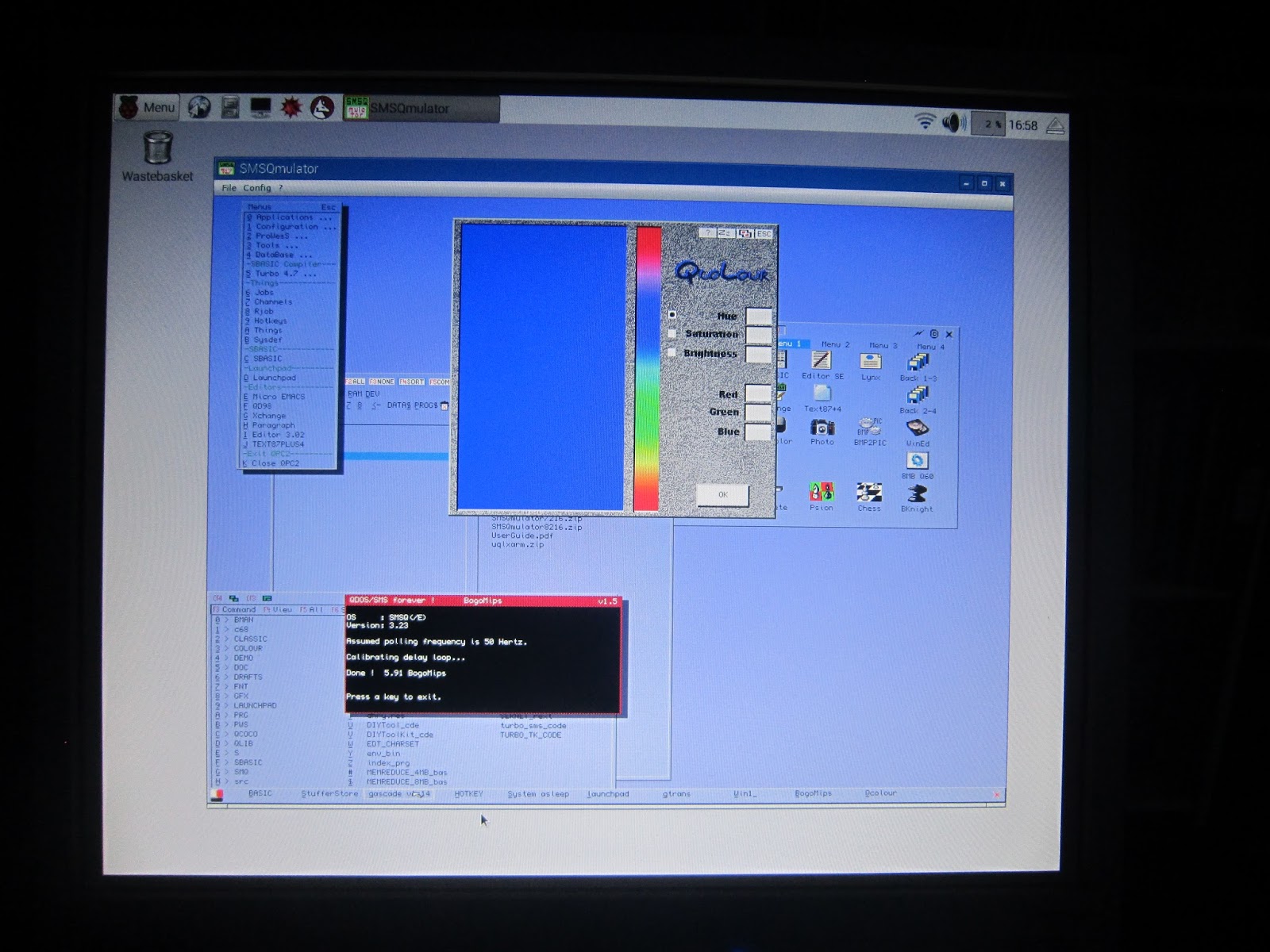
The 2 images above show that uqlx and SMSQmulator both exceed the performance of the fastest systems tested above.
Model & Setup INT REAL TRIG TEXT GRAF STORE TOTAL INDEX
-------------------------------------------------------------------------
Amstrad CPC 6128, Z-80 CPU, Turbo-Pascal, CP/M (c't 10/87)
7.9 67.6 117.0 79.5 7.9 16.5f 296.4 0.752
Amiga 2000, 1MB, Lattice-C (c't 6/88)
0.4 4.4 3.0 49.6 2.8 6.0f 66.2 5.185
Atari 1040ST, 1MB, DRI-C (c't 6/88)
0.3 3.1 2.5 41.1 1.6 21.4f 70.0 6.948
Archimedes 310, 1MB, Archimedes-Basic Interpreter (c't 6/88)
2.1 2.3 1.1 2.5 1.8 7.2f 17.0 12.232
MAC SE 68000, 7.8Mhz, 1MB, Turbo-Pascal (c't 8/89)
0.5 44.1 83.4 38.3 7.5 1.8 175.6 3.202
MAC II 68020, 16Mhz, Turbo-Pascal (c't 8/89)
0.3 6.6 8.0 82.5 5.6 1.2 104.2 5.218
MAC IIcx 68030, 16Mhz, Turbo-Pascal (c't 8/89)
0.2 5.8 6.8 73.2 4.6 1.1 91.7 7.010
MAC IIfx 68030, 40Mhz, Turbo-Pascal (c't 5/90)
0.05 1.8 2.0 13.0 1.5 0.9 19.2 24.579
COMPAQ 286, 8Mhz, Turbo-Pascal 4.0, (c't 7/88)
1.6 8.1 13.4 43.4 15.0 0.9r 82.4 2.793
TANDOM 386sx, 16Mhz, Turbo-Pascal, (c't 7/89)
0.1 5.0 7.1 14.4 1.4 1.2 29.2 16.301
IBM PS2-80 386dx, 20Mhz, Micro-Channel, Turbo-Pascal (c't 7/89)
0.05 2.4 3.9 5.6 0.5 1.0 13.5 28.330
The second table is again from the QTop documentation and shows the same tests on a range of non QL systems.
For comparison with modern QL emulators teh QTop-INDEX bench mark for a 80mHz Q60 was 108.88 but for QPC2 on Windows 7 with a core i7 3.05 GHz processor was 473.84, although the bogomips of the Q60 and QPC2 were not so far apart.
Obviously the conclusion is that while the minuscule RPi is not yet in the same league as a Q60 or QPC2 running on a modern PC the performance of uqlx and SMSQmulator on a RPi3 is respectable and in excess of original QLs and many historic QL and other systems.
Monday, 28 March 2016
SMSQmulator on RPi3
Another screen shot.
SMSQmulator on the RPi 3 is a very usable system. The screen shows Eddi the icon editor which is a large QLiberated program which runs exceptionally well under the emulator. On the screen it is possible to see that the emulator was producing 10.94 bogomips despite all the other programmes running. uQLx is a bit more quirky. This is probably not down to the RPi but to its design as a QDOS/Minerva emulator. Hence crashes occurred this morning when QPAC2 version 1.45 was loaded and also separately with the button frame extension. Also Launchpad which can be seen on the screen above had a "General Protection Fault" error with both LP1 and LP2.
The screen shots have been captured by the wonderfully named linux app called scrot - its command line seen above in the terminal window.
SMSQmulator on the RPi 3 is a very usable system. The screen shows Eddi the icon editor which is a large QLiberated program which runs exceptionally well under the emulator. On the screen it is possible to see that the emulator was producing 10.94 bogomips despite all the other programmes running. uQLx is a bit more quirky. This is probably not down to the RPi but to its design as a QDOS/Minerva emulator. Hence crashes occurred this morning when QPAC2 version 1.45 was loaded and also separately with the button frame extension. Also Launchpad which can be seen on the screen above had a "General Protection Fault" error with both LP1 and LP2.
The screen shots have been captured by the wonderfully named linux app called scrot - its command line seen above in the terminal window.
Sunday, 27 March 2016
uQLx on Rpi3
Finally got uQLx running on RPi. Even although the emulator comes precompiled with an installer there is still a bit of a learning curve for the linux novice. For example, once the package had been unzipped on to the RPi where were the example configuration files .uqlxrc files that were mentioned in the text document and were required for the emulator to start correctly. Answer they were in the folder where they should be but were invisible as files beginning with "." in linux are hidden files.
How to boot qdos once the emulator was started. Answer again described in the docs. Either create a folder called mdv1 in the RPi file structure, save in the folder a file named boot, containing the boot instructions and add to the .uqlxrc file the location of the mdv1 folder, easily done one the .uqlxrc examples were found.
Or using the linux terminal add a boot option -b as described in the instructions.
How to start the emulator without retyping the whole command line again etc.
Answer - learn to make a simple shell script under linux containing all the options required on start such as window size and boot file and save this to the desktop or to the files menu. Simple once you know how.
uQLx speed is good. It gets 23.62 bogomips on RPi3 no overclock. This compares to 10.73 bogomips for SMSQmulator on the RPi3 and with 5 or so bogomips for a Supergoldcard original QL.
Some quirks. Trying to open an SBasic window with a y dimension of more than 640 regardless of the emulator window size corrupts the SBASIC code in
memory. Some extensions do not work particularly the FLIM_X and FLIM_Y from DWJ Display code with both returning 0. Also Launchpad crashes with a serious error message. This needs to be explored and will perhaps be in the next post.
Despite the niggles uQLx is a great QL emulator for the RPi as is SMSQmulator.
Monday, 8 February 2016
Black Box QL as USB keyboard for RPi2
This QL has been converted to act as a USB keyboard using Tynemouth Software's conversion kit. Everything seems to work except the power LED. But the keys are mapped and the screen shows SMSQmulator checking the key codes as each key combination is pressed using RWAP Software's short bit of code supplied with the new membrane. "REPeat loop: PRINT CODE(INKEY$(-1)),
The original membrane that came with this case had succumbed to age and was crumbling. Phase 1 and 2 in the lets put a "QL" back in the black box. So far so good.
Sunday, 7 February 2016
SMSQmulator on RPi2
A picture is worth a thousand words or so it is said. The original RPi B was too underpowered to run the Java based SMSQmulator at anything like a usable speed. The original RPi reported that it achieved 3 bogomips in total. The new RPi2 manages 38 bogomips. and SMSQmulator is now well usable. Here is the picture showing that the emulator itself is managing almost 6 bogomips with the RPi 2 overclocked to 1000 MHz, GPU memory set to 256 MB and java v8 installed.
Monday, 1 April 2013
SMSQmulator on Raspberry Pi
In a quick post here is a screen shot of the loaded screen of SMSQmulator on a Raspberry Pi. The screen shot was obtained with the gimp. SMSQmulator runs very slowly on a basic Raspberry Pi. There are some tweaks that may make it more usable but more time is required for that. None the less the SMSQmulator is an amazing achivement. Congratulations W Lenerz. More about the SMSQmulator on RiPi later when QLHeaven gets a better grip on its Linux adventure.
Sunday, 24 March 2013
This was posted from a Raspberry Pi
What this has to do with the QL scene is the Pi is now assembled, connected and functional. Now to learn a bit about linux before moving to the next stage of installing uqlx. Perhaps the Pi will fit into an old QL case. All the leads lying across the desk creates a very nostalgic ambiance.
Sunday, 20 January 2013
SMSQ/E Emulator in Java
On the QL-users list this momentous little announcement from Wolfgang popped up :
Hi all, SMSQmulator, the SMSQ/E machine emulator under Java is now out. You can find it at : www.wlenerz.com/SMSQmulator. (Please note that, the site running under linux, this address is case dependent - grrrr!). Have fun with it. Wolfgang _______________________________________________
And Dilwyn Responded :
Excellent work Wolfgang, now we have a Java based free emulator which runs across many of the major operating systems which have Java installed - Windows, Mac OS X, Linux. I am ploughing through the manuals (both of them, Wolfgang's and Tim Swenson's versions). Important to note as Wolfgang has pointed out that it is not strictly a QL emulator (may not run software which relies on system variables and/or screen at fixed QL addresses) and being a MC68000 emulator, software purposely written to use features of later processors (e.g. Q40/Q60 specific software) won't run. I like the fact it has Native File Access, SMSQ File Access (executable file headers stored) and QXL.WIN access. I would have liked to see full floppy disk access as so many QL users still use them, it would have made file transfer easy. That said, it can read floppy disk image files created on your operating system. Hopefully, someone will write up that process for the various operating systems in time for anyone who has never used disk images before. SMSQmulator supports 16 bit colour and various screen sizes (e.g. 1024x512 or 800x600) although it defaults to 512x256 when you first start it. I like the warning in the manuals about the sound facilities, that although BEEP and Sampled Sound System are supported it might "not sound too nice" due to issues with the Java sound handlers! I also like the fact that a few sample programs have been supplied (3 games and Psion Xchange) - the emulator startup lets you get straight into running a few programs. Great for people new to QL systems or who have never used emulators before. Congratulations Wolfgang and anyone else involved in developing and testing.
Sounds fantastic to QLHeaven
Sunday, 2 December 2012
There is life in old programs yet
The maths tutor program from the February 1989 QL World has proven useful here in QL Heaven. A certain person having to learn times tables found this utility useful. It has everything needed. A learning mode with explanations, a test mode which is probably the most useful, a brain taxing quiz mode and more. The interface is simple but reflects the time at which it was written. The program was installed on a windows laptop with a shortcut icon to launch QPC" which on start up loaded and ran the Multiplication tables program. No QL knowledge needed. No doubt it could be run under windows using other PD or freeware emulators.
Here is the listing if anyone is interested. BTW it has been slightly modified from the listing in the magazine to take advantage of the greater screen terrain available on PCs and hence the font size used may be inappropriate for a base QL. And there are a very small number of other tweaks of little significance.
100 :
200 :
210 :
220 :
230 intro "Multiplication Tables"
240 :
250 test = 0 : DIM tables_list(12)
260 REPeat do_tables
270 menu
280 :
290 IF menu_choice$
INSTR "LRPT"
300 which_table
320 ELSE
330 quiz_tables
test,tables_list
350 END IF
355 :
360 IF menu_choice$
INSTR "T"
370
tables_list(table_choice)=table_choice
380
test_tables(table_choice)
400 END IF
410 IF menu_choice$
INSTR "P"
420
practise_tables(table_choice)
440 END IF
450 IF menu_choice$
INSTR "R"
460
recite_tables(table_choice)
480 END IF
490 IF menu_choice$
INSTR "L"
500
learn_table(table_choice)
520 END IF
530 END REPeat do_tables
540 :
550 :
560 :
570 :
580 :
590 :
600 DEFine PROCedure intro (title$)
610 CSIZE 2,1:PAPER 2:INK 7:CLS
620 AT 5,(26-LEN(title$))/2:PRINT title$:PAUSE 90
630 CSIZE 2,1:PAPER 1:INK 6:CLS
640 END DEFine intro
650 :
660 :
670 :
680 :
690 DEFine PROCedure menu
700 PAPER 6:INK 1:CSIZE 2,1:CLS
710 AT 3,1:PRINT "Press the letter for your choice or
'ESC' to Quit"
720 AT 6,1:PRINT "To learn a table:- ";TO 27;"PRESS L"
730 AT 8,1:PRINT "To recite a table: - " ;TO
27;"PRESS R"
740 AT 10,1:PRINT "To practise a table: - ";TO
27;"PRESS P"
750 AT 12,1:PRINT "For a test on a table:- ";TO
27;"Press T"
760 AT 14,1:PRINT "For a tables quiz:- ";TO
27;"Press Q"
770 REPeat
menu_choice
780 AT 16,27:
PRINT "Which?"
785
menu_choice$=INKEY$(-1) : convert_case
787 IF
menu_choice$=CHR$(27):STOP
790 IF
menu_choice$<>"" AND menu_choice$ INSTR "LRPTQ" THEN
800 EXIT
menu_choice
810 ELSE
820 rub_out
menu_choice$,16,33
830 END IF
840 END REPeat
menu_choice
850 END DEFine menu
860 :
870 :
880 :
890 :
900 DEFine PROCedure which_table
910 CLS
920 AT 4,4:PRINT "Which table < 1,.....,12 >? and
press ENTER"
930 REPeat pick_table
940 AT 14,27: INPUT table_choice$
950 IF
table_choice$<"1" OR table_choice$>"12" THEN
960 rub_out
table_choice$,14,27
970 ELSE
980 LET
table_choice=table_choice$
990 EXIT
pick_table
1000 END IF
1010 END REPeat pick_table
1020 END DEFine which_table
1030 :
1040 :
1050 :
1060 :
1070 DEFine PROCedure learn_table(table_choice)
1080 intro "Learn a Table"
1090 FOR learn=1 TO 12
1100 teach
table_choice,learn:wait:CLS
1110 END FOR learn
1120 recite_tables(table_choice)
1130 END DEFine learn_table
1140 :
1150 :
1160 :
1170 :
1180 DEFine PROCedure recite_tables(table_choice)
1190 intro "Recite a Table"
1200 :
1210 REPeat table_recite
1220 CLS
1230 FOR M = 1 TO 12
1240 AT M,11:PRINT
table_choice:AT M,15:PRINT "x";M
1250 AT M,21:PRINT "=
":AT M,24:PRINT table_choice*M
1260 PAUSE 175
1270 END FOR M
1280 option "Recite","Practice"
1290 :
1300 IF option$ INSTR "CMP" THEN EXIT table_recite
1310 END REPeat table_recite
1320 IF option$ INSTR "P" THEN
practise_tables(table_choice)
1330 IF option$ INSTR "C" THEN
1340 which_table
1350 recite_tab1es
(table_choice)
1360 END IF
1370 END DEFine recite_tables
1380 :
1390 :
1400 :
1410 :
1420 DEFine PROCedure practise_tables(table_choice)
1430 intro
"Practise a Table"
1440 REPeat
table_practise
1450 DIM
hiqh_light(12):LET mistakes=0:CLS
1460 :
1470 FOR M=1 TO 12
1480 AT
M,11:PRINT table_choice:AT M,15:PRINT 'x';M
1490 AT
M,21:PRINT "= ":LET
answer$="?"
1500
check_input answer$,M,24
1510 IF
answer$=tab1e_choice*M THEN
1520
good_news
1530 :
1540 END IF
1550 IF
answer$<>table_choice*M THEN
1560 LET
high_light(M) = 1 : LET mistakes=mistakes+1
1570
bad_news
1590 teach
table_choict,M
1610 wait
1630
Rebuild_table(tab1e_choice),M
1660 END IF
1670 END FOR M
1680 IF mistakes = 0 THEN
1690 option
"Practise", "Test"
1700 END IF :
1710 IF option$
INSTR "CMT" THEN
1720 EXIT
table_practise
1730 ELSE
1740 AT
16,9:PRINT "Practise those in red"
1750 AT
l7,9:PRINT "then press any key. " : wait
1760 END IF
1770 END REPeat table_practise
1780 IF option$ INSTR "T" THEN
test_tables(table_choice)
1790 IF option$ INSTR "C" THEN
1800 which_table
1810
practise_tables ( table_choice )
1820 END IF
1830 END DEFine practise_tables
1840 :
1850 :
1860 :
1870 :
1880 DEFine PROCedure Rebuild_table(table_choice,M)
1890 CLS:CSIZE 2,1
1900 :
1910 FOR row = 1 TO M
1920 IF high_light(row)=1 THEN STRIP 2
1930 AT row,11:PRINT table_choice;" ":AT row,
15:PRINT "x ";row
1940 AT row, 21:PRINT "=" :AT row,24:PRINT
table_choice*row
1950 STRIP 1
1960 END FOR row
1970 END DEFine Rebuild_table
1980 :
1990 :
2000 :
2010 :
2020 DEFine PROCedure test_tables(table_choice)
2030 LOCal a$, time_now$,end_time$
2040 LET test=1
2050 intro "Test a Table"
2060 PAPER 6: INK 0
2070 REPeat
table_test
2080 DIM
number(10)
2090
a$=DATE$:time_now$=a$(16 TO 20)
2100
correct_marker = 0
2110 LET
number_1=table_choice
2120 LET
tables_list(number_1)=table_choice
2130 FOR counter
= 1 TO 10
2140 CSIZE 3,1
2150 CLS
2160 REPeat
multiplier
2170 LET mark=0
2180 LET
number_2=RND(1 TO 12)
2190 FOR
check=1 TO counter
2200 IF
number_2=number(check) THEN mark=1:EXIT check
2210 END FOR
check
2220 IF
mark=0 THEN EXIT multiplier
2230 END REPeat
multiplier
2240 LET
number(check)= number_2
2250 AT 5,6:
PRINT number_1:AT 5,10:PRINT "x
";number_2
2260 AT
5,16:PRINT "= ":LET
answer$="?"
2270
check_input answer$,5,19
2280 IF
answer$=number_1*number_2 THEN
2290
correct_marker= correct_marker+1:good_news: correct
2300 ELSE
2310
bad_news: wrong:teach number_1,number_2: wait
2320 END IF
2330 END FOR
counter
2340 CSIZE 2,1
2350 CLS
2360
a$=DATE$:end_time$=a$(16 TO 20)
2370
minutes=end_time$(1 TO 2)-time_now$(1 TO 2)
2380
time_elapsed=60*(end_time$(1 TO 2)-time_now$(1 TO 2))+end_time$(4 TO
5)-time_now$( 4 TO 5)
2390
faces(correct_marker)
2400 AT
20,10:PRINT "You took "!time_elapsed!"seconds." !
2410 option
"Test","Quiz"
2420 :
2430 IF option$
INSTR "CMQ" THEN EXIT table_test
2440 END REPeat
table_test
2450 IF option$ INSTR "C" THEN
2460 which_table
2470 test_tables (table_choice)
2480 END IF
2490 IF option$ INSTR "Q" THEN quiz_tables test,
tables_list
2500 END DEFine test_tables
2510 :
2520 :
2530 :
2540 :
2550 DEFine PROCedure quiz_tables(test,tables_list)
2560 LOCal a$, time_now$,correct_marker,mark,table
2570 intro "Tables Quiz"
2580 PAPER 6:INK 0
2590 DIM new_tables_list(12),tab(12)
2600 FOR table=1 TO 10
2610
tab(table)=2*table+1
2620 END FOR table
2630 FOR table=11 TO 12
2640 tab(table) =
3*table-9
2650 END FOR table
2660 quiz_list test,tables_list,new_tables_list
2670 :
2680 LET new_tables_list(0)=0:correct_total=0:total_time=0
2690 FOR table = 1 TO 12
2700 IF
new_tables_list(table)<>0 THEN
2710 LET
new_tables_list(0)=new_tables_list(0)+1
2720 END IF
2730 END FOR table
2740 REPeat quiz
2750 intro "There will be
"&new_tables_list(O)&"rounds"
2760 FOR round =1 TO new_tables_list(0)
2770 intro "Round "&round
2780 PAPER 6 : INK 0: CSIZE 3,1
2790 DIM n3(10),n4(10)
2800 a$=DATE$:time_now$=a$(16 TO 20)
2810 correct_marker=0
2820 FOR counter=1 TO 10
2830 CLS:CSIZE 3,1
2840 REPeat
multiplicand
2850
number_3=RND(1 TO 12)
2860 IF
new_tables_list(number_3)<>0 THEN
2870 mark=0
2880 IF
new_tables_list(0)>=10 THEN
2890 FOR
check=1 TO counter
2900 IF
number_3=n3(check) THEN mark=1:EXIT check
2910 END FOR
check
2920 END IF
2930 IF mark=0
THEN EXIT multiplicand
2940 END IF
2950 END REPeat
multiplicand
2960 LET
n3(counter)=number_3
2970 REPeat
multiplier
2980 mark=0
2990
number_4=RND(1 TO 12)
3000 FOR check=1
TO counter
3010 IF
number_4=n4(check) THEN mark=1:EXIT check
3020 END FOR
check
3030 IF mark=0
THEN EXIT multiplier
3040 END REPeat
multiplier
3050 LET
n4(counter)=number_4
3060 AT 5,6: PRINT
number_3:AT 5,10: PRINT "x
";number_4
3070 AT 5,16: PRINT
"= ":LET
answer$="?"
3080 check_input
answer$,5,19
3090 IF
answer$=number_3*number_4 THEN
3100
correct_marker= correct_marker + 1:good_news: correct
3110 ELSE
3120
bad_news:wrong
3130 teach
number_3,number_4:wait
3140 END IF
3150 END FOR counter
3160 CLS:CSIZE 2,1
3170 a$=DATE$:end_time$=a$(16 TO 20)
3180 minutes=end_time$(1 TO 2)-time_now$(1 TO 2)
3190 time_elapsed=60*(end_time$(1 TO 2)-time_now$(1 TO
2))+end_time$(4 TO 5)-time_now$(4 TO 5)
3200 faces(correct_marker)
3210 AT 12,10:PRINT "You took
"!time_elapsed!"seconds."
3220 PAUSE 150
3230 LET correct_total=correct_total+correct_marker
3240 LET total_time=total_time+time_elapsed
3250 CLS
3260 END FOR round
3270 CLS
3280 AT 5,4:PRINT "You got ";correct_total;"
outof ";round*10;" correct"
3290 AT 7,5:PRINT "You took
"!total_time!"seconds. "
3300 PAUSE 150
3310 option "Quiz"," "
3320 :
3330 IF option$ INSTR "M" THEN EXIT quiz
3340 END REPeat quiz
3350 END DEFine quiz_tables
3360 :
3370 :
3380 :
3390 :
3400 DEFine PROCedure correct
3410 AT 6,9: INK 2:FLASH 1:PRINT "Well done!"
3420 PAUSE 100: FLASH 0: INK 0
3430 END DEFine correct:
3440 :
3450 :
3460 :
3470 :
3480 DEFine PROCedure wrong
3490 AT 6,5: INK 2: FLASH 1: PRINT "No. Wait for help
!"
3500 PAUSE 100 :FLASH 0:INK 0
3510 END DEFine wrong
3520 :
3530 :
3540 :
3550 :
3560 DEFine PROCedure bad_news
3570 FOR j= 1 TO 255
3580 BEEP 500,j
3590 END FOR j
3600 END DEFine bad_news
3610 :
3620 :
3630 :
3640 :
3650 DEFine PROCedure good_news
3660 FOR j= 100 TO 4000 STEP 500
3670 BEEP 5000,j: PAUSE 5
3680 END FOR j
3690 END DEFine good_news
3700 :
3710 :
3720 :
3730 :
3740 DEFine PROCedure teach(n1,n2 )
3750 CLS:CSIZE 2,1
3760 AT 1,1:PRINT "To work out "!n1! "
x"!n2!":":PRINT
3770 FOR j=1 TO n1
3780 FOR k=1 TO n2
3790 PRINT
"*";
3800 END FOR
k:PRINT
3810 END FOR j
3820 AT 5,17 : PRINT "There are " ;n1:AT 6,17 ::
PRINT "lots of ";n2;" 's"
3830 AT 7,17 : PRINT "If you count all"
3840 AT 8,17 : PRINT "the stars, you":AT
9,17:PRINT "wiI1 find that"
3850 AT 10,17 : PRINT "there are ";n1*n2:AT 11,17:
PRINT "of them. "
3860 AT 12,17 : FLASH 0 : PRINT "So: "
3870 AT 14,17:UNDER 0: CSIZE 2,1:PRINT n1 ;" x
";n2;" = ";n1*n2
3880 FLASH 0: UNDER 0: CSIZE 2,1
3890 AT 17,17: PRINT "Press any key."
3900 CSIZE 2,1
3910 END DEFine teach
3920 :
3930 :
3940 :
3950 :
3960 DEFine PROCedure faces(cownt)
3970 CLS
3980 AT 1,1: PRINT "You got ";cownt;" of them
right, "
3990 increment=0: radius=7
4000 FOR n=1 TO cownt
4010 CIRCLE n*radius+1+increment,80,radius
4020 ARC n*radius+1+increment - 2.6, 78 TO
n*radius+1+increment+2.6,78,PI
4030 POINT n*radius +1+increment - 2,82 : POINT n*radius+
1+increment+2,82
4040 increment=increment+radius+2
4050 END FOR n
4060 AT 12,1:PRINT "and ";10 - cownt;" of
them wrong"
4070 increment=0
4080 FOR n=1 TO 10-cownt
4090 CIRCLE n*radius+1+ increment,50,radius
4100 ARC n*radius+1+increment-2.6,46 TO
n*radius+1+increment+2.6,46,-PI
4110 POINT n*radius+1+increment-2,52:POINT
n*radius+1+increment+2,52
4120 increment=increment+1+radius+2
4130 END FOR n
4140 END DEFine faces
4150 :
4160 :
4170 :
4180 :
4190 DEFine PROCedure wait
4200 LOCal a$
4210 a$=""
4220 REPeat loop
4230 a$=INKEY$
4240 IF a$ <>
"" THEN EXIT loop
4250 END REPeat loop
4260 END DEFine wait
4270 :
4280 :
4290 :
4300 :
4310 DEFine PROCedure rub_out(text$,text_line,column)
4320 LET length = LEN(text$)
4330 AT text_line,column:PRINT FILL$(" ",length)
4340 END DEFine rub_out
4350 :
4360 :
4370 :
4380 :
4390 DEFine PROCedure check_input(answer$,text_line,column)
4400 REPeat get_input
4410 AT
text_line,column : INPUT answer$
4420 IF
answer$="" OR answer$=" " THEN GO TO 4410
4430 IF
answer$<="0" OR answer$>"999" THEN
4440 rub_out
answer$,text_line,column
4450 ELSE
4460 EXIT
get_input
4470 END IF
4480 END REPeat get_input
4490 END DEFine check_input
4500 :
4510 :
4520 :
4530 :
4540 DEFine PROCedure option(level$,change$)
4550 PAUSE 125 : CSIZE 2,1
4560 IF level$(1) INSTR "RPT" THEN AT 14,4: PRINT
"Press C to Change table"
4570 AT 15,4:PRINT "Press R to Repeat"
4580 AT 16,4:PRINT "Press M to obtain Menu"
4590 IF change$<>" " THEN
4600 AT 20,4 :
PRINT "Press ";change$(1);" to move on to a ";change$
4610 END IF
4620 REPeat choose_option
4630 AT 22,4: PRINT
"Which?";
4635 menu_choice$=INKEY$(-1)
: convert_case :option$=menu_choice$
4640 IF
option$<>"" AND LEN(option$)=1 THEN
4650 IF
(change$=" " AND option$ INSTR "RM" ) OR (level$(1) INSTR
"RPT" AND option$ INSTR "RCM"&change$(1) ) THEN
4660 EXIT
choose_option
4670 ELSE
4680 rub_out
option$, 18,10
4690 END IF
4700 ELSE
4710 IF
option$<>"" THEN rub_out option$,18,10
4720 END IF
4730 END REPeat choose_option
4740 END DEFine option
4750 :
4760 :
4770 :
4780 :
4790 DEFine PROCedure quiz_list(test,tables_list,new_tables_list)
4800 AT 6,2: PRINT "The quiz will be on the
following"
4810 AT 7,2: PRINT "Multiplication tables: "
4820 AT 9,5: PRINT;
4830 FOR tab1e=1 TO 12
4840 IF test=0
THEN
4850 PRINT
" ";table;
4860 ELSE
4870 IF tables_list(table)<>0 THEN PRINT
" ";table;
4880 END IF
4890 END FOR table
4900 PRINT " "
4910 AT 12,5:PRINT "Press A to Accept this list. "
4920 AT 14,5:PRINT "Press C to Change this list. "
4930 REPeat quiz_on
4940 AT 16, 5: PRINT "Which?"
4945
menu_choice$=INKEY$(-1):convert_case:quiz_on$=menu_choice$
4950 IF quiz_on$<>" " AND LEN(quiz_on$)=1
THEN
4960 IF quiz_on$
INSTR "AC" THEN
4970 EXIT
quiz_on
4980 ELSE
4990 STRIP 1:
rub_out quiz_on$,16,11: STRIP 6
5000 END IF
5010 ELSE
5020 IF
quiz_on$<>"" THEN STRIP 1:rub_out quiz_on$, 16,11 :STRIP 6
5030 END IF
5040 END REPeat quiz_on
5050 IF quiz_on$ INSTR "c" THEN
5060 alter_list
test,tables_list,new_tables_list:RETurn
5070 ELSE
5080 FOR table=1 TO
12
5090 IF test=1 THEN
LET new_tables_list(table)=tables_list(table)
5100 IF test=0
THEN LET new_tables_list(table)=table
5110 END FOR table
5120 END IF
5130 END DEFine quiz_list
5140 :
5150 :
5160 :
5170 :
5180 DEFine PROCedure alter_list(test,tables_list,new_tables_list)
5190 LOCal pick_table
5200 PAPER 1:CLS:STRIP 7:INK 0
5210 AT 8,2 : PRINT "< or >, to choose,
to select"
5220 AT 9,10: PRINT " to delete"
5230 AT l0,2: PRINT " when your list is
complete"
5240 AT 15,3: PRINT "Multiplication tables chosen:
-"
5250 CSIZE 1,0
5260 n=1
5270 REPeat quiz_on
5280 FOR table=1 TO
12
5290 STRIP 7
5300 IF table=n
THEN STRIP 2
5310 AT
13,tab(table)-2: PRINT table;
5320 END FOR table
5330 a$=INKEY$(-1)
5340 IF
a$=CHR$(192) THEN n=n-1:IF n=0 THEN n=1
5350 IF
a$=CHR$(200) THEN n=n+1:IF n=13 THEN n=12
5360 IF a$=CHR$(32)
THEN
5370 LET
new_tables_list(n)=n
5380 AT
17,tab(n)-2:STRIP 2:PRTNT n
5390 END IF
5400 IF
a$=CHR$(194) THEN
5410 LET new_tables_list(n)=0
5420 AT
17,tab(n)-2 : STRIP 1:PRINT "
"
5430 END IF
5440 IF a$=CHR$(10)
THEN
5460 LET
pick_table=O
5470 FOR check=1
TO 12
5480 LET
pick_table= pick_table+new_tables_list(check)
5496 END FOR
check
5500 IF
pick_table<>0 THEN CLS:PAPER 6:INK 0:EXIT quiz_on
5510 END IF
5520 END REPeat quiz_on
5530 END DEFine alter_list
5540 :
5550 :
5560 :
5570 :
5580 DEFine PROCedure convert_case
5590 IF CODE(menu_choice$)>90 :
menuchoice$=CHR$(CODE(menu_choice$)-32)
5600 END DEFine convert_case
Monday, 1 October 2012
RaspberryPi
The Raspberry Pi user guide is in. QL Heaven is going to read this before getting a RPi. There a a lot more possibilities to this than running uQLx on it.
Sunday, 29 July 2012
Gold Card
Just seen a Gold Card go on ebay for exactly £109.77. WOW. No guarantees it was functional. It was sold as "new", in unopened packaging. BTW how was it photographed for the sale? Any way the image here is a Gold card, just not the one sold. This one is definitely functional. But what it demonstrates is that there is still demand for faster QL hardware. Any possibility of adapting an emulator to run natively on RPi?
Monday, 8 August 2011
What do QLers want for their next QL?
This question occurred to QL Heaven when perusing the latest posts on the ql-users list regarding the Raspberry Pi PC on a USB stick. Mouths watered at the prospect of a QL running on this system and porting a QL OS onto it. Reality eventually bit through Marcel Kilgus who posted in response to an earlier post speculating about running QPC2 under WINE on Linux on a Raspberry Pi - "
Norman Dunbar wrote:
> Well, I suspect that QPC will run under WINE on any flavour of Linux,
>and not necessarily one that has an Intel Processor of x86 fame beneath
>it.
Hmm, where to begin... The very name of WINE itself stands for "Wine
Is Not an Emulator". It does not do ANY CPU emulation. So, running QPC
is downright out. Actually there is a WINE port for ARM, but it only
works with Windows apps that have been cross-compiled for the ARM
architecture (QPC, being much assembler code, cannot be cross
compiled).
Additionally there is a way to employ the QEMU x86 emulator, but
I somehow doubt running an unsupported QEMU solution on such a slow
and limited platform would really work or be anything near usable.
> More specifically, SuperBasic is "just" a language - albeit a good one.
> So I suppose someone could write a SuperBasic interpreter/compiler in,
> say C, to be packaged up and/or compiled from source on any Linux.
While this is true, most power of the language comes from its
extensions and these would all have to be rewritten, too.
Cheers, Marcel"
Basically, no pun intended, it seems that QPC2 is written in assembler and therefore cannot be ported to non PC systems while SBASIC could be ported as a language but with out all the extensions written for it.
Yet what we know about the QL scene from the survey conducted earlier this year is that most QLers have either or both a black box QL, (plus or minus an expansion card) plus QPC2 emulator running on a PC.
The black box give the nostalgia return while QPC2 gives power, flexibility and ease of undertaking complex computing tasks on a QL like system. This takes QL Heaven back to one of its earlier posts suggesting that the future of the QL should be on a mini PC system as the list was suggesting but one that while small can run windows and therefore QPC2, but is small enough to be installed in the carcass of a QL black box.
Norman Dunbar wrote:
> Well, I suspect that QPC will run under WINE on any flavour of Linux,
>and not necessarily one that has an Intel Processor of x86 fame beneath
>it.
Hmm, where to begin... The very name of WINE itself stands for "Wine
Is Not an Emulator". It does not do ANY CPU emulation. So, running QPC
is downright out. Actually there is a WINE port for ARM, but it only
works with Windows apps that have been cross-compiled for the ARM
architecture (QPC, being much assembler code, cannot be cross
compiled).
Additionally there is a way to employ the QEMU x86 emulator, but
I somehow doubt running an unsupported QEMU solution on such a slow
and limited platform would really work or be anything near usable.
> More specifically, SuperBasic is "just" a language - albeit a good one.
> So I suppose someone could write a SuperBasic interpreter/compiler in,
> say C, to be packaged up and/or compiled from source on any Linux.
While this is true, most power of the language comes from its
extensions and these would all have to be rewritten, too.
Cheers, Marcel"
Basically, no pun intended, it seems that QPC2 is written in assembler and therefore cannot be ported to non PC systems while SBASIC could be ported as a language but with out all the extensions written for it.
Yet what we know about the QL scene from the survey conducted earlier this year is that most QLers have either or both a black box QL, (plus or minus an expansion card) plus QPC2 emulator running on a PC.
The black box give the nostalgia return while QPC2 gives power, flexibility and ease of undertaking complex computing tasks on a QL like system. This takes QL Heaven back to one of its earlier posts suggesting that the future of the QL should be on a mini PC system as the list was suggesting but one that while small can run windows and therefore QPC2, but is small enough to be installed in the carcass of a QL black box.
Sunday, 17 July 2011
The Button Frame
QL heaven wonders how many QLers actually do anything with the button frame other than to put buttons to sleep in it. QL heaven got fed up with the button frame at the top left corner of the screen and has for may years placed it indented 40x20 pixels - suits the Q60 screen resolution. Admittedly that change is quite tame but no one seems to anything at all with the button frame.
Now the Ser-USB device has moved 120+MB of data from the Q60 - which is about 10 years old, and while going strong may not last forever, QL Heaven is looking at making a useful set up with QPC2. Screen resolution is one issue with emulators as the QL uses a 2:1 ratio but PC monitors traditionally had a more square type of resolution. This seems to be changing with the wide screen flat screen monitors now favoured in the PC world. QL Heaven's PC has a 23" flat screen monitor that supports resolutions close to 2:1 ratio thereby making the QL fonts and programs appear more as expected.
The resolution that seems to work best with QPC2 on QL Heaven's monitor is 1366x768 giving a ratio of 1.8 approximately. The screen shot from QPC2 also shows that modern PC hardware can emulate faster that native QL hardware now. The Q60 managed around 150 bogomips but QPC2 is getting over 200.
Getting back to the button frame QPAC2 can be configured to place the button frame anywhere and any size within screen limits. Jochen Merz released a button frame SBASIC extension enabling SBASIC programmers to create button tools. The GD2 colours and icon editors enable the programmer to create icons for these button tools. Effectively all the prerequisites are there for QLers to create a modern interface such as seen on the latest Macs where there is a row of 3D icon tools at the bottom of the screen.
Is anyone doing this, perhaps it belongs in QL Heavens crazy idea list.
Tuesday, 14 June 2011
QPC2 on Windows 7
QPC2 is the commercial QL emulator for the PC. There are also a number of other emulators that are shareware and are also very capable. Recently at QL Heaven the local PC was "upgraded" to Windows 7 and new things happened with QPC2. Basically files save to the QXL.win hard disk container were not retained after QPC2 was shut down. This it seems is down to permissions in the latest version of windows. This did not seem to be an issue with XP before. The solution after struggling around a bit was to run QPC2 always as the administrator to allow it to write to the PC's hard drive through the QXL.win filing system.
Incidentally as part of the investigation QPC2 3.34 (vista) was installed but this neither helped or showed any compatibility problems as did the previous version of QPC2 that had been in use of XP.
Subscribe to:
Posts (Atom)