There has been an upsurge in QL related hardware developments over the past 12-36 months (excellent) with several coming to market and several seeming to be still in development and one limited by the need to find legacy chips.
Supplied by Tetroid ( based in the Russian Fedeartion) there are new Goldcard clones, Trumpcard clones, Qubide interfaces and back planes and recently when he managed to track down some obsolete chips a handful of SuperGoldCard clones were poduced and sold. Tetroid seems to have produced so many new cloned expansion cards that the bottom has fallen out of the market in used Goldcards and other used memory expansion cards as shown by the multiple listings of a number of expansion cards including an original GoldCard, at a price reduced from that achieved previously, on ebay.
In terms of new original hardware there is the Q68. How many have been sold is not known here but as each batch seems to have been around 40 units and at least 3-4 batches have been mentioned on the QL Forum the figure could well be in 3 digits. So that is a success.
There also seems to be a direct QL clone/evolution in the discussions around an issue 8 motherboard on the QL forum. This seems to be driven by Dave and Nasta and might be on the market sometime this year. Again this seems to have generated a lot of interest.
For those still running QLs based on the original motherboard Marcel Kilgus reported in his blog that he is working on a solution to the problem of displaying the QL screen on a modern TFT monitor see.
There is also the Retro-Printer project from RWAP. This is not specific to the QL but will allow a range of retro computer systems including the QL to print to modern printers.
In addition from the author of QPC2 came QL-SD an adapter for SD cards fitted in to one of the original QL microdrive slots.
What next, will Tetroid produce some sort of an ultra gold card upgrade of his GoldCard clone, will the LAN drivers and TCP/IP stack be released for Q68 or what? The impression here at QLheaven is that there does not seem to have been this level of new hardware activity since the Q40/Q60 of the late 1990.
Apologies to anyone whose hardware project has been inadvertently missed off this review.
Showing posts with label Hardware. Show all posts
Showing posts with label Hardware. Show all posts
Thursday, 25 April 2019

Monday, 22 October 2018
Answer to a question on the QLforum
In answer to polka's question in the QL Forum, here is a snippet of my boot code that allows the selection of multiple hardware configurations using a single boot file and to load alternative operating systems if desired.
The key elements are a timed loop that will start a default configuration if nothing is selected during the timeout period. Otherwise if an alternative configuration is chosen a file that indicates the selected cofiguration is written to the primary partition of the hard disk. This is used after the configuration of smsq/e is loaded and started by the boot file to set up the drivers and programs for the previously selected configurations.Nothing is written to these file but they could be used to add different adaptions to the boot.
1000 REMark Overwrite the ROM SMSQ/E 2.91
1010 :
1020 REMark -- Mount Win2_,Win3_& Win4_ to make
immediatly available --
1030 WIN_DRIVE 2,0,1 : WIN_DRIVE 3,0,2 : WIN_DRIVE
4,0,3 : ft=0
1040 REMark for the moment DONT automatically mount
all drives except backup
1050 REMark AS DISK IS NOT ATTACHED
1060 REMark for the 1ST IDE SLAVE channel
1070 REMark WIN_DRIVE 5,1,0:WIN_DRIVE
6,1,1:WIN_DRIVE 7,1,2:WIN_DRIVE 8,1,3
1080 REMark for the 2ND IDE MASTER channel
1090 REMark WIN_DRIVE 5,2,0:WIN_DRIVE
6,2,1:WIN_DRIVE 7,2,2:WIN_DRIVE 8,2,3
1100 :
1110 WINDOW
#0;SCR_XLIM(#0),SCR_YLIM(#0),0,0:CSIZE#0,0,0:INK#0,2:PAPER#0,0:CLS#0
1120 IF PEEKS$(2,3)='RES': GO TO 1930
1130 :
1140 WINDOW #1;256,128,128,64:INK#1,4:PAPER#1,0
1150 PAPER#1,0
1160 INK#1,7:PRINT "F1";:INK#1,4:PRINT
" for SMSQ/E 3.33 (QMAC) + FAT32"
1170 INK#1,7:PRINT "F2";:INK#1,4:PRINT
" for SMSQ/E 3.33 (QMAC) + QUBide"
1180 INK#1,7:PRINT "F3";:INK#1,4:PRINT
" for SMSQ/E 3.33 (QMAC) + Win5-8"
1190 INK#1,7:PRINT "F4";:INK#1,4:PRINT
" for SMSQ/E 3.33 + FAT16"
1200 PRINT
1210 INK#1,7:PRINT "F5";:INK#1,4:PRINT
" for Test Versions of SMSQE & QPAC2"
1220 INK#1,7:PRINT "F6";:INK#1,4:PRINT
" for QDOS Classic"
1230 INK#1,7:PRINT "F7";:INK#1,4:PRINT
" for Mode4 SMSQ/E 3.32"
1240 INK#1,7:PRINT "F8";:INK#1,4:PRINT
" for SMSQE Compile Enviroment"
1250 INK#1,7:PRINT "F9";:INK#1,4:PRINT
" for SMSQ/E 3.13 mode 4 and PSION Chess"
1260 PRINT
1270 PRINT "
Timeout SMSQ/E 3.33 (QMAC) Win1-4 only"
1280 :
1290 timeout=DATE
1300 timeout=timeout+15
1310 REPeat lp
1320 IF PEEKS$(2,3)='RES':EXIT lp
1330 key=CODE(INKEY$(#0))
1340 SELect ON key
1350 :
1360 =232 :
REMark F1 overwrite the ROM with SMSQ/E 3.33
1370
OPEN_OVER#3,"Win1_DoMountFat32":CLOSE#3:key=0
1380
AT#0,2,12
1390
PRINT#0,"INSERT CADDY with FAT32 CF card. Press ANYKEY"
1400
PAUSE#0
1410
IF PEEKS$(2,3)<>'RES':LRESPR "Win1_SMS_Q40smsq333_ROM"
1420 :
1430 =236 :
REMark F2 go with SMSQ/E 3.33 + QUBide
1440 OPEN_OVER#3,"Win1_DoQUBide":CLOSE#3:key=0
1450
AT#0,2,12
1460
PRINT#0,"INSERT CADDY with QUBide CF card. Press ANYKEY" :
PAUSE#0
1470
IF PEEKS$(2,3)<>'RES':LRESPR "Win1_SMS_Q40smsq333_ROM"
1480 :
1490 =240 :
REMark F3 go with SMSQ/E 3.33 and Wins 5-8
1500
OPEN_OVER#3,"Win1_DoMountAll":CLOSE#3:key=0
1510
AT#0,2,12
1520
PRINT#0,"INSERT CADDY with HD containing Win5-8. Press ANYKEY"
: PAUSE#0
1530
IF PEEKS$(2,3)<>'RES':LRESPR "Win1_SMS_Q40smsq333_ROM"
1540 :
1550 =244 :
REMark F4 Use the new version of SMSQ/E with 3.33
1560
OPEN_OVER#3,"Win1_DoFAT16":CLOSE#3:key=0 : AT#0,2,15
1570
PRINT#0,"INSERT CADDY with FAT16 CF card. Press ANYKEY" :
PAUSE#0
1580
IF PEEKS$(2,3)<>'RES':LRESPR "WIN1_SMS_Q40smsq333_rom"
1590
REMark IF PEEKS$(2,3)<>'RES':LRESPR "WIN1_rom"
1600 :
1610 =248 :
REMark F5 Test version of SMSQ/E
1620
OPEN_NEW#3,"Win1_TestQPAC2":CLOSE#3:AT#0,2,12
1630
IF PEEKS$(2,3)<>'RES':LRESPR "Win1_SMQ_smsq_q40_testrom"
1640 :
1650 =234 :
REMark F6 load QDOS Classic
1660
LRESPR Win1_Classic_SoftRom_rext
1670
COPY Win1_CLASSIC_CLASSICr_rom TO ram1_CLASSICr_rom
1680
PRINT#0,"Wait for Drive Light to go out, then Press Anykey to
continue"
1690
PAUSE
1700
SOFTROM ram1_CLASSICr_rom
1710 :
1720 =238 :
REMark F7 boot Mode 4 from Win1_
1730
OPEN_NEW#3,"Win1_Mode4":CLOSE#3
1740
IF PEEKS$(2,3)<>'RES':LRESPR
"Win1_SMS_Q40smsq332mode4_ROM"
1750 :
1760 =242 :
REMark F8 Try SMSQ/E compile environment
1770
OPEN_NEW#3,"Win1_CmpEnv":CLOSE#3
1780
BEEP 5000,0
1790
IF PEEKS$(2,3)<>'RES':LRESPR "Win1_SMS_Q40smsq333_rom"
1800 :
1810 =246 :
REMark F9 boot 3.13 into mode 4
1820
OPEN_NEW#3,"Win1_psionchess":CLOSE#3
1830
IF PEEKS$(2,3)<>'RES':LRESPR "WIN1_SMS_q40mode4_rom"
1840 :
1850 =250 :
REMark F10 smsq/e 3.33
1860
IF PEEKS$(2,3)<>'RES':LRESPR "Win1_SMS_Q40smsq333_rom"
1870 :
1880 END SELect
1890 IF DATE>timeout
1900
key=0:IF PEEKS$(2,3)<>'RES':LRESPR "Win1_SMS_Q40smsq333_rom":EXIT lp
1910 END IF
1920 END REPeat lp
1930 :
1940 drv$="WIN1_" : REMark Boot default directory
1950 REMark -- LOAD Enviroment Variable support
early --
1960 LRESPR(drv$&"env_bin") : REMark
used by all c68 progs
1970 :
1980 errt=FOPEN("Win1_DoMountFAT32")
1990 IF errt>0
2000
CLOSE#errt:DELETE "Win1_DoMountFAT32"
2010
WIN_DRIVE 5,2,0,0,"QXL.WIN"
2020
OPEN_OVER#3,ram1_Win5dump: DIR#3,Win5_:CLOSE#3:DELETE ram1_Win5dump
2030
SETENV "HDTYPE=FAT32"
2040 END IF
2050 :
2060 errt=FOPEN("Win1_DoMountAll")
2070 IF errt>0
2080
CLOSE#errt:DELETE "Win1_DoMountAll"
2090
WIN_DRIVE 5,2,0:WIN_DRIVE 6,2,1:WIN_DRIVE 7,2,2:WIN_DRIVE 8,2,3
2100
SETENV "HDTYPE=ALLWINS"
2110 END IF
2120 :
2130 errt=FOPEN("Win1_DoFAT16")
2140 IF errt>0
2150
CLOSE#errt:DELETE "Win1_DoFAT16" : WIN_DRIVE 5,2,0,0
2160
SETENV "HDTYPE=FAT16"
2170 END IF
2180 :
2190 errt=FOPEN("Win1_CmpEnv") : IF
errt>0 :CLOSE#errt:LRUN Win1_Bootsmq_bas
2200 :
2210 errt=FOPEN("Win1_psionchess")
2220 IF
errt>0
2230
CLOSE#errt:DELETE Win1_psionchess
2240 EX
Win1_PRG_PSION_Chess_exe:STOP
2250 END IF
2260 :
2270 errt=FOPEN("Win1_Mode4")
2280 IF errt>0
2290
CLOSE#errt:DELETE "Win1_Mode4"
2300
REMark LRESPR("Win3_QTOP_thorgold_bin"):EX Win3_QTOP_TINDEX :
STOP
2310 LRUN
Win4_StartUp_Qx0boot
2320 END IF
2330 :
2340 TK2_EXT:IF VER$(1)>2.95 AND
VER$(1)<=3.03:Set_Mode4_Colours
2350 key=KEYROW(7):REMark press "x" to
load ProWess
2360 :
2370 IF
VER$(1)<3 .03="" span="">
2380
LRESPR ('WIN1_CACHEMODES_rext') :WRITETHROUGH
2390
REMark LRESPR ('WIN1_MOVP4SMSQ60_cde')
2400 END IF
2410 REMark although MOVEP instruction removed from
SMSQ/E 3.00 on there are some in Text87
2420 REMark so LRESPR 060 patch anyway
2430 LRESPR ('WIN1_MOVP4SMSQ60_cde')
2440 :
2450 IF VER$(1)=2.98 AND (key=0 OR key=8):DISP_SIZE
1024,512
2460 IF VER$(1)=2.99 AND (key=0 OR key=8):DISP_SIZE
1024,512
2470 :
2480 IF key=64:STOP
2490 :
2500 REMark -- Set Some Default Devices --
2510 IF SCR_LLEN>=128
2520
PWSDIR$="Win1_PWS_" :
REMark ProWesS default directory
2530 END IF
2540 DATA_USE "WIN1_" : PROG_USE
"WIN1_"
2550 DEV_USE 1,Win1_PRG_EDT_ : REMark Editor 2.05
directory
2555 DEV_USE 8,FLP1_ : REMark make a device for CUE
shell on Q68 to access a floppy
2560 :
2570 REMark set Colour Theme
2580 IF VER$(1)>=3.03:EX
Win1_COLOUR_CoCo_setconf_bas;"Win1_COLOUR_CoCo_Themes_greys_thm,0"
2590 IF VER$(1)>=3.03:EX Win1_COLOUR_CoCo_setconf_bas;"Win1_COLOUR_CoCo_Themes_cream_thm,1"
2600 IF VER$(1)>=3.03:EX
Win1_COLOUR_CoCo_setconf_bas;"Win1_COLOUR_CoCo_Themes_blueme_thm,2"
2610 IF VER$(1)>=3.03:EX
Win1_COLOUR_CoCo_setconf_bas;"Win1_COLOUR_CoCo_Themes_copper_thm,3"
2620 :
2630 REMark set up window colours
2640 tcol=0
2650 IF VER$(1)>2.95:COLOUR_PAL:tcol=176
2660 WINDOW
#0;SCR_XLIM(#0),SCR_YLIM(#0),0,0:CSIZE#0,0,0:INK#0,4:PAPER#0,tcol:CLS#0
2670 :
2680 BGCOLOUR_24 $919FCC : REMark BGCOLOUR_24
$AAAAFF : REMark BGCOLOUR_24 $878787
2685 REMark BGCOLOUR_24 $0
2690 : REMark Can we use ProWess
2700 errt=FOPEN("Win1_DoProWess")
2710 IF errt>0 : key=8 : CLOSE#errt:DELETE
Win1_DoProWess
2720 IF SCR_LLEN>=128 AND key=8
2730 IF
PWSDIR$(LEN(PWSDIR$))<>"_" THEN PWSDIR$=PWSDIR$&'_'
2740 LRESPR
PWSDIR$&"ext_dll_rext"
2750 LRESPR
PWSDIR$&"ext_syslib_rext"
2760 LRESPR
PWSDIR$&"ext_global_rext"
2770 LRESPR
PWSDIR$&"ext_PWbasic_rext"
2780
dd_err=0 : REMark for DATAdesign error trapping
2790 END IF
2800 :
2810 :
2820 REMark -- LOAD Extended environment extensions
--
2830 IF VER$(1)>3.02
2840
LRESPR(drv$&"menu_rext")
2850
errt=FOPEN("Win1_TestQPAC2")
2860 IF
errt>0
2870
CLOSE#errt:DELETE Win1_TestQPAC2
2880
LRESPR(drv$&"QPAC2_test")
2890 ELSE
2900
REMark LRESPR(drv$&"QPAC2_patch")
2910
LRESPR(drv$&"QPAC2_145a")
2920 END IF
2930 ELSE
2940
LRESPR("Win1_PRG_QD98_Menu_rext_old")
2950
LRESPR("Win1_TOOLS_QPAC2_Qpac2_139")
2960 END IF
2970 LRESPR ("Win1_QPTR")
2980 :
2990 REMark - Any more resident extensions?
3000 REMark --LOAD SERNET --
3010 BAUD
2,115200 : SER_ROOM 2,4096
3020
LRESPR("Win1_PRG_SERNET_sernet_rext")
3030 SNET 2
3040 SERNET
3050 :
3060 REMark install PFF virutal device whatever
3070 LRESPR ("Win1_PrinCtrl_PFF_bin")
3080 :
and so on for loading extensions.
Saturday, 6 October 2018
Reading Long File Names on FAT formatted SD cards
FAT drivers have been embedded in smsq/e for some time. Initially FAT12 for DOS formatted floppy disks and now FAT16 for the Q68. One frustrating thing about the drivers is that they only support the DOS short file name naming convention of 11 characters. This truncates names and makes it difficult to identify files in a list of similarly named files as shown.

The conventions for constructing LFNs can be found on the internet so after a bit of SBASIC work here is a first iteration of a menu system to manage files via their LFN on FAT 16 formatted disks.
The interface still needs a bit of work.
 Multiple files can now be copied, moved or deleted from the FAT16 formatted SDHC card using their LFNs.

The conventions for constructing LFNs can be found on the internet so after a bit of SBASIC work here is a first iteration of a menu system to manage files via their LFN on FAT 16 formatted disks.
The interface still needs a bit of work.

Friday, 25 May 2018
Q68 in QLHeaven
A Q68 is here at last. It is a lovely QL replacement/development. Loads of memory, a 68000 compatible processor emulation making loads of old software run well, 16 bit colour and a range of screen modes that all display well on flat screen monitors. It comes supplied with a 4 GB SDHC card containing 8 QXL.WIN type hard drive files absolutely loaded with freeware software. The super QDock front end comes as part of the package.

The preferred display here is 16 bit mode 33 512x384 giving high colour compatible with modern software, a slighly larger display than the original QL and a speed that is the same a superGoldCard QL or slightly faster. All in all a super QL system. More later.

The preferred display here is 16 bit mode 33 512x384 giving high colour compatible with modern software, a slighly larger display than the original QL and a speed that is the same a superGoldCard QL or slightly faster. All in all a super QL system. More later.
Saturday, 20 January 2018
More of Win Drives and QPAC2 FILES thing and .jpgs
The previous post outlined how the Q60 here at QL Heaven could have its hard drive configuration modified at boot time using a caddy system to swap the drives. The next question to consider is how the system and programs running within it can know which combination of drives had been configured at boot. The answer is the Environment Variables extension. This is LRESPRed in the boot file just before the selected drive configuration is mounted by the boot. As the drives are mounted the environment variable HDTYPE is set to a value that can be checked in a program to findout which Win drives were mounted without having to test each drive individually and trap errors. Below is a little SBASIC snippet of code that pops up a files window for each drive mounted of whichever type. Set up a little icon in launchpad, click on that and there are files windows for all drives. Handy if you cannot exactly remember which drive had that subdirectory you were looking for.
1000 EXEP 'Files';'\DWin1_ \C1,2 \O',"Win1_"
1010 EXEP 'Files';'\DWin2_ \C1,2 \O',"Win2_"
1020 EXEP 'Files';'\DWin3_ \C1,2 \O',"Win3_"
1030 EXEP 'Files';'\DWin4_ \C1,2 \O',"Win4_"
1040 IF (GETENV$("HDTYPE")="ALLWINS")
1050 EXEP 'Files';'\DWin5_ \C3,2 \O',"Win5_"
1060 EXEP 'Files';'\DWin6_ \C3,2 \O',"Win6_"
1070 EXEP 'Files';'\DWin7_ \C3,2 \O',"Win7_"
1080 EXEP 'Files';'\DWin8_ \C3,2 \O',"Win8_"
1090 END IF
1100 IF (GETENV$("HDTYPE")="FAT32")
1110 EXEP 'Files';'\DWin5_ \C3,2 \O',"Win5_"
1120 END IF
The program in action below. There are two screen scrapes below. Both .jpg files created on the Q60. The difference between them is the size of the file - approximately 50k for an identical image. The larger file was created using QTImage while the smaller file was created using cjpeg a small very old utility obtained on a floppy disk from PD library some time in the 1990s.
Finally rereading the QPAC2 documentation revealed that the files thing can filter files as well as sorting them. Selecting the F2 source menu, inputting a source drive such as Win2_and adding an extension, Win2__bas will list only all the files with that extension in the given directory. Sometimes useful for searching out that file hidden in plain sight.


Sunday, 14 January 2018
Boot Menu for Q60 with Multiple Hard Drive Formats
With the latest version of smsq/e the Q60 can handle QXL.win files on FAT32 formatted media and QUBide formatted disks and media as well as its native QWA hard disk format. There are also the options of booting the Q60 in to mode 4 smsq/e or the QDOS classic or Linux. In addition there may be specific configurations of the OS for some jobs. A boot options menu is a define necessity. Below are screen scrapes of QL Heaven's current boot menu showing 3 of the options in operation.
The Q60 for those who do not know comes with an ancient ROMMed version of smsq/e. This is 2.97 if my recollection is correct. The GD2 drivers are not present in this version, so mode 4 and possibly mode 8 colours are only possible. It's not a terribly good version of smsq/e now. Its function is to load a boot file that loads a newer version of smsq/e. That is obvious but with the multiple options for launching the Q60 into action and the at least 4 different incompatible hard disk formats that could be attached to the system there is a problem especially if a CD/DVD is also to be attached. The Q60 has 2 ISA slots which can supply IDE connections giving 4 possible maximum IDE devices. The tower the q60 board exists within has 2 internal 3.5 inch drive bays and 3 external 5&1/4 inch bays.
Mounting hard disks internally caused problems for smsq/e if the appropriate drivers are not loaded.
The answer is a boot menu and a caddy system for the hard disks to mount them in the external 5&1/4 inch bays. As a result the Q60 has a default timeout boot with 4 QWA partitions on the primary hard disk. A second QWA disk with additional partitions can be mounted if that boot option is chosen or a QUBIDE formatted disk instead or a FAT 32 disk with 4 QXL.win files acting as 4 additional partitions.
As an alternative the primary hard disk in it's caddy can be swapped out and replaced if the Q60 is to be booted in to LINUX or QDOS classic.
The trick for this system is to communicate from the boot menu to the reloaded boot file once the new version of smq/e has been loaded as neither boot file or smsq/e has any means of remembering which option had been selected so that the correct drivers are loaded for the current hard drive configuration. How that is done is quite simple and inelegant but functional, the boot file writes a note to itself on the primary hard disk. When it is reloaded it looks for the note that tells it which hard disk configuration has been selected, reads it loads the correct driver and deletes the note.


The Q60 for those who do not know comes with an ancient ROMMed version of smsq/e. This is 2.97 if my recollection is correct. The GD2 drivers are not present in this version, so mode 4 and possibly mode 8 colours are only possible. It's not a terribly good version of smsq/e now. Its function is to load a boot file that loads a newer version of smsq/e. That is obvious but with the multiple options for launching the Q60 into action and the at least 4 different incompatible hard disk formats that could be attached to the system there is a problem especially if a CD/DVD is also to be attached. The Q60 has 2 ISA slots which can supply IDE connections giving 4 possible maximum IDE devices. The tower the q60 board exists within has 2 internal 3.5 inch drive bays and 3 external 5&1/4 inch bays.
Mounting hard disks internally caused problems for smsq/e if the appropriate drivers are not loaded.
The answer is a boot menu and a caddy system for the hard disks to mount them in the external 5&1/4 inch bays. As a result the Q60 has a default timeout boot with 4 QWA partitions on the primary hard disk. A second QWA disk with additional partitions can be mounted if that boot option is chosen or a QUBIDE formatted disk instead or a FAT 32 disk with 4 QXL.win files acting as 4 additional partitions.
As an alternative the primary hard disk in it's caddy can be swapped out and replaced if the Q60 is to be booted in to LINUX or QDOS classic.
The trick for this system is to communicate from the boot menu to the reloaded boot file once the new version of smq/e has been loaded as neither boot file or smsq/e has any means of remembering which option had been selected so that the correct drivers are loaded for the current hard drive configuration. How that is done is quite simple and inelegant but functional, the boot file writes a note to itself on the primary hard disk. When it is reloaded it looks for the note that tells it which hard disk configuration has been selected, reads it loads the correct driver and deletes the note.


Sunday, 17 December 2017
SMSQ/E 3.32 AND FAT32 QXL.win DEVICE
This new facility is an excellent addition for Qx0 users. Back up of Qx0 hard disks and transfer of their contents to other QL systems has been problematic up to now. QPC2 uses the QXL.win file as hard disk, Supergold card QLs would use the QUBide hard disk interface, while the disk structure of the Qx0 hard disk was based on the Atari hard disk conventions. Three incompatible systems. Here at QL Heaven the Q60 hard disk was originally backed up to compact flash cards via a CF reader, and then in addition it was copied to external hard disks via a caddy system. Both of the hard disk IDE slots on the primary ISA card are attached to caddies to allow swapping of IDE disks, not hot swapping however. Latterly the contents of the Q60 hard disk were exported to a QPC2 QXLwin file via the serial port to a USBwiz device. This was a magical system but never entirely stable or compatible with all file handling programs so the transfer was somewhat hard work.

Now there is the FAT32 QXL.win device. This is at an early stage of development but works just fine. QLHeaven can report the trouble free transfer of the entire contents of the Q60 hard disk to a QXL.win file masquerading as Win5_. A FAT 32 CFcard was used simply because one and a CF card reader were to hand. Below is the card reader sitting inside the caddy.
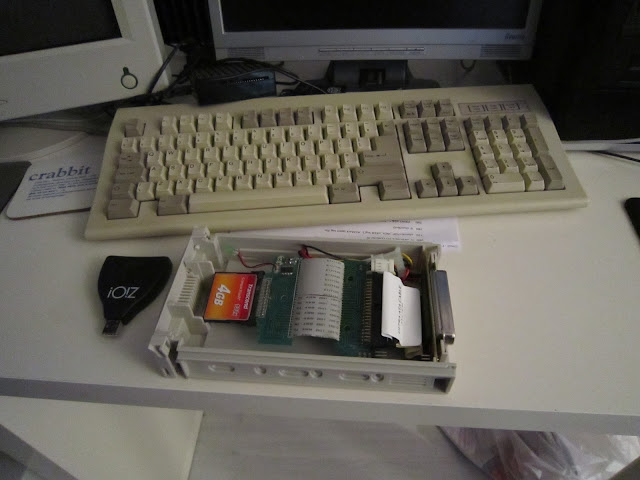
Below is a view of the caddies on the Q60. Find SMSQ/E 3.32 here


Now there is the FAT32 QXL.win device. This is at an early stage of development but works just fine. QLHeaven can report the trouble free transfer of the entire contents of the Q60 hard disk to a QXL.win file masquerading as Win5_. A FAT 32 CFcard was used simply because one and a CF card reader were to hand. Below is the card reader sitting inside the caddy.

Below is a view of the caddies on the Q60. Find SMSQ/E 3.32 here

Friday, 24 November 2017
Q60 and QTOP Index
QLheaven is exceedingly pleased that some of this blog's posts have come to the attention of the QL Forum and have even stirred up some discussion.
The Q60 QTOP-index measurement of 108.88 mentioned in a previous post RPi and QL emulator speeds that was considered to be wrong. This post was actually about the speeds of QL emulation on a Raspberry Pi using either uqxl or smsqmulator. This post showed that these 2 emulators on the modest RPi could perform better than many of the old QL type hardware systems.
Figures for the Q60 and QPC2 were thrown in for context and perhaps some more information regarding the set up of the Q60 could have been given as this was given for the surprisingly very high QPC2 speed which was largely down the PC hardware.
QLHeaven was itself surprised by the relatively low figure of 108.88 that QTOP had produced for the the Q60. But many factors can affect the production of benchmark figures. In the case of the Q60 the setting for the 68060 processors caches will markedly affect this as will the screen size and graphics mode in use. Other software running at the same time as the bench marking software tends to have a significantly lesser effect on the benchmark level produced.Although the slightly better performace of the Q60 with write through caches and 16 bit colour at 1024x512 is thought to be due to improvements in smsq/e over the 18 months or so since the last tests.
QLHeaven will freely confess to routinely using the write through cache setting instead of the faster copyback setting as copyback often screws up compiled SBASIC, such as QLiberated programs making copyback difficult to live with. Secondly the Q60 is almost always used in 16bit colour 1024x512 screen resolution, so it seemed fair to use a QTOP index with these settings. And here is the evidence of the effect of screen resolution,size and cache settings.
* Only software running - TINDEX
As can be seen the key influences on the TINDEX result are the cache mode, screen resolution and colour mode.


The Q60 QTOP-index measurement of 108.88 mentioned in a previous post RPi and QL emulator speeds that was considered to be wrong. This post was actually about the speeds of QL emulation on a Raspberry Pi using either uqxl or smsqmulator. This post showed that these 2 emulators on the modest RPi could perform better than many of the old QL type hardware systems.
Figures for the Q60 and QPC2 were thrown in for context and perhaps some more information regarding the set up of the Q60 could have been given as this was given for the surprisingly very high QPC2 speed which was largely down the PC hardware.
QLHeaven was itself surprised by the relatively low figure of 108.88 that QTOP had produced for the the Q60. But many factors can affect the production of benchmark figures. In the case of the Q60 the setting for the 68060 processors caches will markedly affect this as will the screen size and graphics mode in use. Other software running at the same time as the bench marking software tends to have a significantly lesser effect on the benchmark level produced.Although the slightly better performace of the Q60 with write through caches and 16 bit colour at 1024x512 is thought to be due to improvements in smsq/e over the 18 months or so since the last tests.
QLHeaven will freely confess to routinely using the write through cache setting instead of the faster copyback setting as copyback often screws up compiled SBASIC, such as QLiberated programs making copyback difficult to live with. Secondly the Q60 is almost always used in 16bit colour 1024x512 screen resolution, so it seemed fair to use a QTOP index with these settings. And here is the evidence of the effect of screen resolution,size and cache settings.
Q60 80mHz QTOP speed test results
Screen Size
|
Screen Mode
|
Cache
|
QTOP Index
|
1024x512
|
16 bit
|
Writethrough
|
110.635
|
1024x512
|
16 bit
|
Copyback
|
122.523
|
1024x512
|
16bit
|
Copyback*
|
138.096
|
512x256
|
16 bit
|
Writethrough
|
110.006
|
512x256
|
16 bit
|
Copyback
|
137.756
|
512x256
|
mode 4
|
Writethrough*
|
148.326
|
512x256
|
mode 4
|
Copyback*
|
194.845
|
As can be seen the key influences on the TINDEX result are the cache mode, screen resolution and colour mode.


 | |

Wednesday, 2 August 2017
Aurora Qubide and SuperGold card build completed
It has taken a while particularly as getting components to work with retro QL hardware is getting harder as time passes. None the less Aurora is up and running with a DVD/CD drive, CF card for hard drive and a single ED floppy disk drive plus the Aurora motherboard, SuperHermes, Qubide and a SuperGold card with a backplane all installed in a mini PC ATX box.The QUBide card roms have been updated to 3.08 and SMSQ/E 3.31 also installed.

The box for the installation had only one external drive bay, and when originally designed a 3.5 inch HDD could be fix on a caddy slung from a single fixing point below this. In front of the HDD a board provided USB connections accessible to the front of the case and hidden behind movable flap.


 As can be seen from the photographs the interior of the case is crammed full. A caddy has been made for the 3.5 inch floppy disk and a slot fore it cut through the case to the front. The CF card in its adapter sits on top of the floppy disk drive. The backplane with Aurora, SuperGold card and Qubide sit transversely in the case with the Aurora board bolted to the case. The SuperGold Card is supported by a lego bridge across the Aurora board. This unfortunately cannot be seen due the the heat sink and the cables. As a first iteration of the installation it is a pleasing result although some tidying of cables and redundant connectors is still required.

The box for the installation had only one external drive bay, and when originally designed a 3.5 inch HDD could be fix on a caddy slung from a single fixing point below this. In front of the HDD a board provided USB connections accessible to the front of the case and hidden behind movable flap.


Wednesday, 26 July 2017
QUBide upgrade to 3.0x
A seller : - "zaxon" based in Poland using www.sellmyretro.com has offered an upgraded chipset for the QUBIDE card. This is Alain
Haoui's new QubATA 3.06 driver for QUBIDE cards, fitted with
the newer v2 GAL chip. Upgrading the chipset avoids the need to LRESPR the new advanced driver for QUBide hard drives. Payment is via paypal. Once ordered the chipset came by post within 4 working days. It was as advertised except that the original ROM was the 2.02 QUBide ROM. A message via the sellmyretro site to zaxon got an immediate apology and the correct ROM was rapidly posted out.


The original ROMs were carefully levered out using a small flat bladed screwdriver and the new ROMs inserted carefully in to the correct sockets with the correct orientation. The pins on the new chips had to be carefully eased in to slightly more vertical positions for the chips to slide in to the sockets evenly and smoothly. All the chips were replaced so that the QUBide card now has 2.02 GAL chips and a ROM that was thought to be 3.06. I forgot to photograph the card with all chips finally inserted but anyway the test was to power up the Aurora QL.

The driver reports itself as 3.08Q not 3.06, what the difference is is unknown at this point. Also it is not clear what the unknown/faulty device that is being detected. However the CF card hard disk and the CDROM drives are correctly detected and function correctly. As the CF card device has slots for both a master and slave CF and there is no card inserted in to the slave slot this might be the cause of the report. Otherwise it has been a painless upgrade of the QUBide card.


The original ROMs were carefully levered out using a small flat bladed screwdriver and the new ROMs inserted carefully in to the correct sockets with the correct orientation. The pins on the new chips had to be carefully eased in to slightly more vertical positions for the chips to slide in to the sockets evenly and smoothly. All the chips were replaced so that the QUBide card now has 2.02 GAL chips and a ROM that was thought to be 3.06. I forgot to photograph the card with all chips finally inserted but anyway the test was to power up the Aurora QL.

The driver reports itself as 3.08Q not 3.06, what the difference is is unknown at this point. Also it is not clear what the unknown/faulty device that is being detected. However the CF card hard disk and the CDROM drives are correctly detected and function correctly. As the CF card device has slots for both a master and slave CF and there is no card inserted in to the slave slot this might be the cause of the report. Otherwise it has been a painless upgrade of the QUBide card.
Saturday, 8 July 2017
Compact Flash card IDE Adapter and the Aurora QL
The old Aurora card is getting a refurbishment. It has spent probably 10 years in a box when space became tight and the old tower case it had been installed in had to be removed. A new case for the Aurora and its supporting components was needed. A cheap £30 black case was ordered from Amazon and the Aurora card, Qubide 2.01, SuperGold card and old style backplane were installed. Amazingly the original hard drive used with the Aurora system was still fully functional and held all the installed software. Installing these cards and HDD was not simple. The power connectors from the PSU were not compatible with the backplane power sockets. Fortunately the original 1990s PC power supply had been stored as well. The power connectors were removed from this and grafted on to the power cables from the new PSU. Fortunately the colour coding of the power cables inside PCs had not changed. The original PSU was also too large to fit in to the new case.
The next major problem came with the need to fit a floppy disk, HDD and CDROM in the case, basically even when all the modern USB cables and connectors were stripped out there was not enough room for everything inside.
Browsing Amazon, there was a CF card adaptor advertised that had been reviewed by a QL Aurora user and found to be suitable for the Aurora. Checking with Dilwyn Jones QL blog suggested that he had been the reviewer. So reassured the CF card adaptor was ordered. As the card was designer to connect to a 2 inch IDE cable and 2 inch to 3.5 inch adaptor was also bought.

 Getting the correct orientation of the CF card adapter and the IDE cable adapter was tricky. The location of pin 1 on the cable adapter is marked by a small arrow seen in the image. As for the CF card adapter pin 1 was indicated on the circuit board in small print. The cable adapter had one of the central pin holes in the connector missing. This needed to be drilled out as the card had all 44 pins to be connected.
None the less it was all fitted together and here is it with an old CF card inserted in a test run copying files from the HDD to the CF card.


The next major problem came with the need to fit a floppy disk, HDD and CDROM in the case, basically even when all the modern USB cables and connectors were stripped out there was not enough room for everything inside.
Browsing Amazon, there was a CF card adaptor advertised that had been reviewed by a QL Aurora user and found to be suitable for the Aurora. Checking with Dilwyn Jones QL blog suggested that he had been the reviewer. So reassured the CF card adaptor was ordered. As the card was designer to connect to a 2 inch IDE cable and 2 inch to 3.5 inch adaptor was also bought.


None the less it was all fitted together and here is it with an old CF card inserted in a test run copying files from the HDD to the CF card.


Tuesday, 4 July 2017
QUBide 3.10 and the Q60

Alain Haoui excellent new version of the QUBide drivers for the QUBide card and with a extension version for the Q40 and Q60 which adds the ability to read and write to QUBIDE formatted hard disks and compact flash cards on the Qx0 systems. Here is a screen dump of Dilwyn Jones's Qtrans program showing the contents of win1_ alongside a copy of the contents of my Aurora QUBide system's hard disk which has been copied to a compact flash card on the Aurora and then read on the Q60 via the CF card reader. How cool is that.
By the way the .jpg used was created in 3 passes. The screen was saved as a pic file. This was converted to a .bmp using a utility called QLtoQ40gfx and then from a .bmp to a jpg using a utility called cjpeg. Here is the ram disk containing all 3 versions of the image file and their sizes.

Monday, 1 April 2013
SMSQmulator on Raspberry Pi

In a quick post here is a screen shot of the loaded screen of SMSQmulator on a Raspberry Pi. The screen shot was obtained with the gimp. SMSQmulator runs very slowly on a basic Raspberry Pi. There are some tweaks that may make it more usable but more time is required for that. None the less the SMSQmulator is an amazing achivement. Congratulations W Lenerz. More about the SMSQmulator on RiPi later when QLHeaven gets a better grip on its Linux adventure.
Wednesday, 26 December 2012
Raspberry Pi in a QL Case
There has been talk of using the Raspberry Pi as a platform for a QL successor. Here below are links to a site showing how someone has built a RPi into a QL case and connected it to the orginal QL keyboard. Although unless you are set on retaining the original QL's limited range of keys and their feel, it would seem easier to find on ebay a slimline mini usb keyboard of the required dimensions and fit this in place of the original keyboard with if needed a little trimming of the case.
http://www.deblauweschicht.nl/tinkering/qlkeys1.html
http://www.deblauweschicht.nl/tinkering/qlkeys2.html
http://www.deblauweschicht.nl/tinkering/qlkeys1.html
http://www.deblauweschicht.nl/tinkering/qlkeys2.html
Sunday, 29 July 2012
Gold Card

Tuesday, 12 June 2012
QL Hardware
Memory Lane computing has pulled out of developing the QL-SD card although it is said that the drivers are ready. The project is now back with Peter Graf - who originated it. It is not surprising really that the project became non viable as the number of users of black box QL must now be minuscule and when last surveyed a few years ago this die hard group had been most resistant to upgrading or spending anything on hardware over the preceding decades. C'est la vie.
If hardware projects are to succeed they must tap into the modernisers group of QL users
If hardware projects are to succeed they must tap into the modernisers group of QL users
Saturday, 14 January 2012
LCD Screen for Qx0
QL Heaven has acquired a Technika LCD 24 inchTV that had a faulty screen cover that had slipped down on the front of the TV by 0.5 to 1cm. Some sort of glue used seemed to have softened. Otherwise the set was fully functional. The TV is a wide screen and defaults to a 16:9 display. It has like many TVs these days a RGB PC port. Since the TV was heading to the dump and QL Heaven was desperate to get the massive 17 inch CRT monitor off the desk the Q60 was tried with the TV. Here is what it looked like.
The Techika model number is LCD 24-620

The image is reasonably acceptable in QL Heaven's view. The full 1024x512 display is not visible with lines lost at the right of the screen and at the bottom. The visible area of the display appears to be 960x480 which is not bad indeed. If it is possible to set the maximum screen size recognised by smsqe to this size then using a TV like this could provide an acceptable display. Has anyone else tried an LCD TV with a Qx0 or Aurora system?
Here are some other pictures also showing 3D Psion Chess running on a Q60 and displayed on a 24 inch LCD screen. Is that good or not.

The Techika model number is LCD 24-620

The image is reasonably acceptable in QL Heaven's view. The full 1024x512 display is not visible with lines lost at the right of the screen and at the bottom. The visible area of the display appears to be 960x480 which is not bad indeed. If it is possible to set the maximum screen size recognised by smsqe to this size then using a TV like this could provide an acceptable display. Has anyone else tried an LCD TV with a Qx0 or Aurora system?
Here are some other pictures also showing 3D Psion Chess running on a Q60 and displayed on a 24 inch LCD screen. Is that good or not.

Saturday, 17 December 2011
Debugging Listings and the Future is Black
Two ideas in one post. QL Heaven has been unable to post for a while thanks to BT (British Telecom for non UK readers). QL Heaven recently moved to BT's Infinity Broadband service. Up to 41 MB downloads and an uncapped connection. Cable connection not required. It was great until the outage, only a few weeks after the connection had been set up. 5 days no service despite 4 conversations with the "help line service" which is based outside the UK. Eventually an engineer was promised and arrived. It took the engineer half a day to fix the problem which was something to do with the frequencies in the fiber optic cables, ie nothing to do with QL Heaven at all.
Debugging
Problems aside QL Heaven has been trying to debug the 3D noughts and crosses listing on the basis of run the program and see where it fails and try to pick out the bug from the code running. This is proving somewhat inconclusive. QL Heaven has identified a number of typos that have made problems but many remain. Is there a structure or scientific way to debug programs. QL Heaven has decided the logical way to proceed now is to print out the typed in listing and compare it line by line with the QL World listing. Is there any6 simpler way to sort this out?
The Future is Black
On the QL user listing Peter Graf has been describing his progress with installing a SD card reader in one of the MDV slots of a basic QL. This has generated much interest. Memory Lane computing is also progressing with a ROM slot SD card reader project for black box QLs. The future is black.
A SuperGold card replacement is now definitely needed.
Additionally the Aurora replacement motherboard has a ROM slot. This slot was backwards compatible when the Aurora was launched baut could need an adapter for ROM modules that was available from QUBBESoft PD at the time Aurora was launched. QUBBESoft has stopped trading some time ago. Non the less the details should be obtainable. Imagine an Aurora board with SD card hard drive in the ROM slot installed in an original QL case and able to display on modern TFT monitors as the Aurora display sizes are compatible with these unlike most bits of QL hardware.
A SuperGold card replacement is now definitely definitely needed.
Debugging
Problems aside QL Heaven has been trying to debug the 3D noughts and crosses listing on the basis of run the program and see where it fails and try to pick out the bug from the code running. This is proving somewhat inconclusive. QL Heaven has identified a number of typos that have made problems but many remain. Is there a structure or scientific way to debug programs. QL Heaven has decided the logical way to proceed now is to print out the typed in listing and compare it line by line with the QL World listing. Is there any6 simpler way to sort this out?
The Future is Black
On the QL user listing Peter Graf has been describing his progress with installing a SD card reader in one of the MDV slots of a basic QL. This has generated much interest. Memory Lane computing is also progressing with a ROM slot SD card reader project for black box QLs. The future is black.
A SuperGold card replacement is now definitely needed.
Additionally the Aurora replacement motherboard has a ROM slot. This slot was backwards compatible when the Aurora was launched baut could need an adapter for ROM modules that was available from QUBBESoft PD at the time Aurora was launched. QUBBESoft has stopped trading some time ago. Non the less the details should be obtainable. Imagine an Aurora board with SD card hard drive in the ROM slot installed in an original QL case and able to display on modern TFT monitors as the Aurora display sizes are compatible with these unlike most bits of QL hardware.
A SuperGold card replacement is now definitely definitely needed.
Subscribe to:
Posts (Atom)
